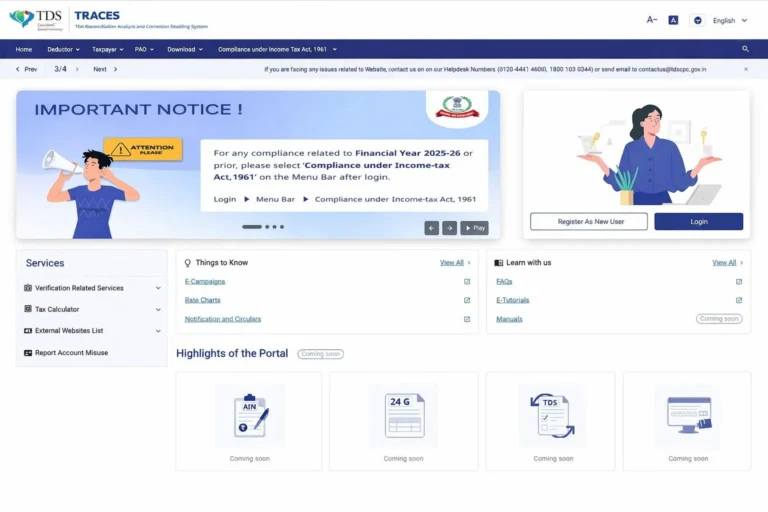
The Income Tax Department has revamped the TRACES (TDS Reconciliation Analysis and Correction Enabling System) portal with a new interface and updated navigation. For all compliance work related to Financial Year 2025-26 and earlier periods, users must now select ‘Compliance under Income Tax Act, 1961’ from the menu after logging in. This article explains exactly what has changed, how to navigate the updated portal, and what you need to do to stay compliant without any disruption.
Quick Reference: TRACES Portal Update at a Glance
Detail | Information |
Portal Name | TRACES (TDS Reconciliation Analysis and Correction Enabling System) |
Managed By | Income Tax Department of India |
What Changed | Revised interface and navigation menu |
Applicable Period | Financial Year 2025-26 and all prior years |
Key Action Required | Select ‘Compliance under Income Tax Act, 1961’ after login |
Navigation Path | Login → Menu Bar → Compliance under Income Tax Act, 1961 |
Who Is Affected | Deductors, taxpayers, tax professionals, CA firms |
What Is the TRACES Portal?
TRACES is the official online platform managed by the Income Tax Department of India. It is the primary system for everything related to Tax Deducted at Source (TDS) and Tax Collected at Source (TCS). Employers, businesses, and deductors use it to file TDS returns, download Form 16 and Form 16A, view TDS credit, and respond to compliance notices.
The portal serves millions of taxpayers and deductors across India. Any disruption in its usability or navigation can directly affect compliance timelines, which makes this update important to understand quickly.
What Has Changed in the Revamped TRACES Portal?
The Income Tax Department has rolled out a fresh interface for the TRACES portal. The changes include a revised design, reorganized menu options, and updated navigation paths. While the core functions remain the same, how you access them has shifted.
The most critical change for users handling compliance for FY 2025-26 or any earlier financial year is the new menu path. Previously, compliance-related options were more directly accessible. Now, after logging in, you must specifically select the correct compliance section from the menu bar.
New Navigation Path for Income Tax Compliance
Login → Menu Bar → Compliance under Income Tax Act, 1961 |
This path applies to all tasks related to TDS returns, corrections, Form 16 downloads, and other compliance activities for Financial Year 2025-26 and all prior years. Skipping this step or selecting the wrong menu may result in errors or inability to access the required sections.
Who Does This Update Affect?
This change affects anyone who uses the TRACES portal for Income Tax compliance, including:
- Deductors filing quarterly TDS returns (Form 24Q, 26Q, 27Q, 27EQ)
- Employers downloading Form 16 for employees
- Businesses generating Form 16A for vendors or contractors
- Tax professionals and CA firms managing TDS compliance for clients
- Taxpayers verifying TDS credit in Form 26AS
Step-by-Step: How to Access Compliance Features After the Update
Follow these steps to reach your compliance section without confusion:
- Step 1: Visit the TRACES portal at traces.gov.in and log in with your credentials (TAN, PAN, or taxpayer login as applicable).
- Step 2: Once logged in, locate the Menu Bar at the top of the screen.
- Step 3: Click on ‘Compliance under Income Tax Act, 1961’ from the available menu options.
- Step 4: Access your required function – TDS return filing, Form 16 download, correction statements, or other compliance tasks.
Key Takeaways and Practical Tips
- Always select ‘Compliance under Income Tax Act, 1961’ from the menu after every login – this is now mandatory for FY 2025-26 and prior compliance.
- Clear your browser cache if the new interface does not load correctly after the update.
- Inform your accounts team, payroll team, or CA about the new navigation to prevent delays.
- If you manage multiple TANs, verify that each login follows the same new path.
- Bookmark the correct section after the first successful navigation to save time on future visits.
Conclusion
The TRACES portal revamp is a significant interface upgrade that every deductor, employer, and tax professional in India needs to be aware of immediately. The core change is straightforward: after logging in, always navigate to ‘Compliance under Income Tax Act, 1961’ from the menu bar before accessing any TDS or compliance function for FY 2025-26 or prior years. Adapting to this new navigation quickly will help you avoid delays, missed deadlines, and unnecessary compliance risks. Share this update with your team and stay ahead of the change.
You can call or Whatsapp us at +91 9769647582 for any query or requirement related to TDS filing.
Frequently Asked Questions (FAQs)
Q1. Does this update affect my TDS return filing for FY 2025-26?
Yes. For any compliance related to FY 2025-26 or earlier, you must select ‘Compliance under Income Tax Act, 1961’ from the menu bar after logging in. Without this, you may not be able to access the filing or correction options.
Q2. Has the TRACES portal URL changed?
No, the portal URL remains the same at traces.gov.in. Only the interface and internal navigation have been updated.
Q3. Will old TDS data and past filings still be accessible?
Yes. All historical data, filed returns, and downloaded certificates remain intact. The revamp only changes how you navigate to these sections, not the underlying data.
Q4. What if I cannot find the new menu option?
If you do not see ‘Compliance under Income Tax Act, 1961’ on your menu bar, try clearing your browser cache, using a different browser, or logging out and back in. If the issue persists, contact the TRACES helpdesk.
Serving across india
- Income tax
- GST
- Business registration
- Accounting
- Audit
- ROC filings
- Certificates
- Project report or CMA data